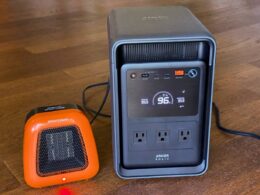
Anker Solix E10 deep dive review: The alternative to the whole-home generator
A rural setup that begs for storage
I live on a wooded hillside in California’s Napa Valley wine region, above the morning fog that settles in the valley below. It’s rural and beautiful but also a CAL FIRE-designated Very High Fire Hazard Severity Zone.
Pacific Gas & Electric Company (PG&E) serves the area, which practically means two things: electricity is expensive and power outages are relatively common (seven in 2025 alone). Moreover, Public Safety Power Shutoff (PSPS) events can occur; this is when the utility preemptively turns off power to reduce ignition risk during high-fire-danger weather, and these can last for 2-3 days.
For the past several years, my backup for such situations was a portable gas generator that I wheeled out from the garage and connected to the house via a manual transfer switch. It powered the fridge, water pump, and a few lights. It also dominated everything else: loud enough that it made sleeping difficult even with the windows closed and exhaust filling the air as long as it ran. Positioning the unit far enough from the house to be somewhat tolerable required a heavy cable to handle the voltage drop.
During the back-to-back multi-day PSPS events a few years ago, the generator burned through several expensive tanks of gasoline along with more time at the gas station than I ever wanted to spend. After the second event, I started looking seriously at storage.
The rate environment was the second motivator. I installed a 6.7 kW AC Enphase solar array (21 IQ8MC microinverters) at the end of 2025, primarily to help counteract a monthly bill that had become uncomfortable. Solar alone helps during daytime production, but on PG&E’s Net Billing Tariff (NEM 3.0) — the residential successor to NEM 2.0 — the credit for exporting a kWh is a small fraction of the cost of importing one. On my own bills, the import side runs around 32¢/kWh blended and the export credit averages around 4¢/kWh, for a round-trip penalty of roughly 28¢ on every solar kWh that gets exported and bought back later.
Other solar owners had warned me about this exact situation — “you’ll need a battery” — which, as it turns out, is the only practical way to capture most of that spread.

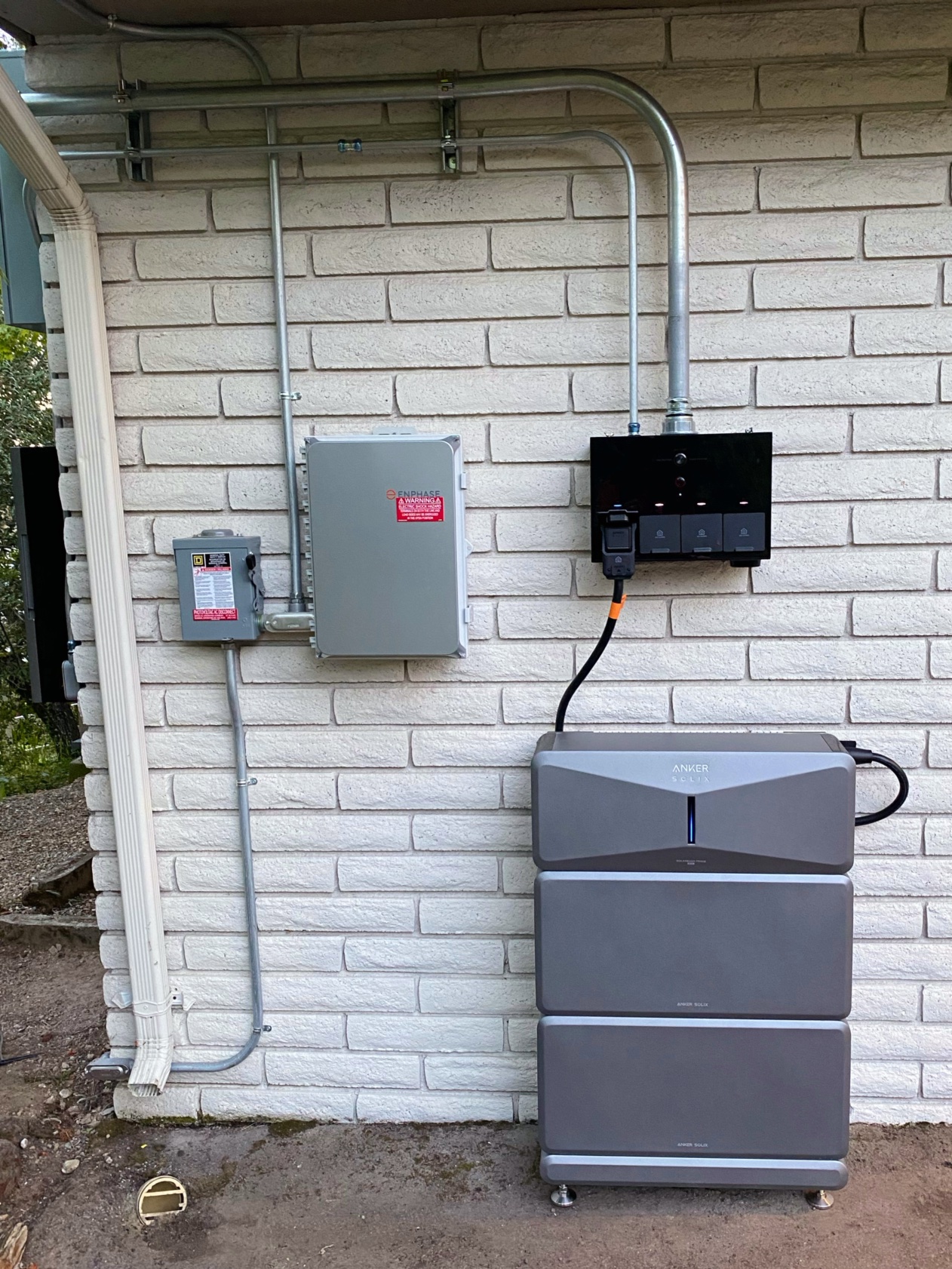
Installation of the PV system that ties into the E10
What the E10 actually is
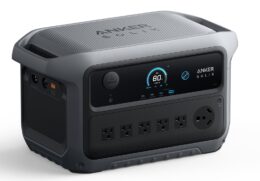
The Anker Solix E10 is a modular battery storage system designed for whole- or partial-home backup. My configuration is one A17E1 inverter module (“Power Module”) on top of two B6000 battery modules (6,144 Wh each, 12,288 Wh of nameplate capacity), tied to an AX170 Power Dock that handles the automatic transfer switch (ATS), backup distribution, and integration with the existing solar.
The Power Dock supports two solar integration patterns. For installations where the E10 is the primary solar inverter, the E10 accepts DC input directly from a PV array. For retrofits like mine, where solar was already in place using its own AC microinverters, the AC output of the existing solar lands on dedicated AC-PV input terminals (Circuits 7 and 8) in the Power Dock, with the integration configured during the commissioning step in the Anker app.
Two design choices set the E10 apart from competing residential storage:
Modular, hand-installable batteries. Each B6000 weighs around 130 lbs and is sized for two people to carry into position. Compared to other residential batteries that ship as a single heavy unit and need lifts to position, the modular approach is both physically easier and offers more flexibility in where the system can go.
A Power Dock with flexible coverage. Whole-home backup means all circuits connect to the Power Dock: via the twelve “smart circuits” (which the ATS can switch off individually for load shedding) plus a pair of lugs that can feed the remaining circuits via a subpanel. Partial-home is the alternative: the Power Dock becomes a subpanel itself, and some loads stay on the main panel without backup.
The cleanest topology is inserting the Power Dock between the meter and the main panel, where every circuit flows through it automatically. My Eaton Integrated Panel shares the meter and breakers in a single enclosure, so the Power Dock is wired into the main panel bus instead as a subpanel, with as many circuits as possible moved to smart-circuit slots and my existing subpanel fed by the lugs. The result is nearly whole-home: only four small lights-and-plugs circuits left on the main panel. Capturing those last four would have required either dual- or quad-breaker adapters (for which the ATS was not yet certified), or adding a new subpanel.
The smart-circuit priorities, which determine the circuits that are essential during an outage and those that can be shed, can be reconfigured in the app at any time, including during an outage.

E10 system installed – inverter module stacked on the two battery modules; combiner box separated from the Power Dock to facilitate flexible battery placement
Headline specs and what Anker confirmed
Several E10 specifications aren’t widely published. Anker confirmed the following in response to my technical questions:
| Parameter | Value | Notes |
|---|---|---|
| Battery module capacity | 6,144 Wh | B6000 module; 60 Ah at 102.4 V nominal |
| Inverter module storage | 0 Wh | A17E1 has no internal battery; all storage is in the modules below it |
| Max solar input (DC) | 9,000 W per system | Max charge to a single B6000 is 6,000 W; need ≥2 modules for full 9 kW |
| Max system stack | 3 inverters × 5 modules | ~90 kWh total storage at maximum expansion |
| AC-to-AC round-trip efficiency | ~89% | 94.7% charge × 94.07% discharge at 6 kW |
| DC-to-AC efficiency (Smart Generator) | ~93.75% | 99.67% DC input × 94.07% discharge |
| Idle power draw | 46 W base | A17E1 + one B6000; +~9 W per additional B6000 |
| Internal battery heater | up to ~200 W | Active in cold conditions; varies with ambient temperature |
| Thermal derating threshold | 113 °F (45 °C) ambient | Max operating temperature 131 °F (55 °C) |
| Min battery reserve (in app) | 1% | Each module also has independent BMS for over-discharge protection |
| Local/cloud API | Not currently exposed | Anker has noted the suggestion for future roadmap evaluation |
The 89% round-trip number is worth highlighting. Anker hasn’t published it widely, but it lines up with what you’d expect for a modern AC-coupled LFP system; it’s on par with the Tesla Powerwall 3 (89%) and one point behind both Enphase’s IQ Battery 5P (90%) and FranklinWH’s aPower 2 (90%).
On idle power: although Anker’s documentation indicates idle is drawn from the grid when available, smart-meter measurements from my install tell a more nuanced story. On a typical sunny day, with normal appliance use, my home consumed less than 150 Wh from the grid — total. That means most of the 46 W + 9 W idle is being supplied by solar surplus during the day and by the battery overnight, with grid import largely limited to the small loads still on the main panel. Under tariffs like NEM 3.0 — where charges are largely volumetric on imports — minimizing imports is where the value lives, so I appreciate the E10’s behavior here.
Installation
Finding an electrician took some effort. The E10 is new enough in the U.S. market that none of the electricians I contacted had installed one before, and the install model is new: anyone can buy the E10 directly and hire any licensed electrician to install it, rather than going through a certified-installer network like Tesla Powerwall or FranklinWH. The E10 carries UL 9540 certification, which is the same standard everyone else in the category meets. Installer familiarity will catch up as the install base grows and word spreads.
The installation itself was uneventful and took two days, owing mostly to the integrated-panel topology. My electrician came away genuinely impressed: both with how the modular batteries simplified the physical install compared to other residential battery systems he’d worked on, and with the capabilities of the Power Dock/E10 package as a whole. The install documentation and video material were detailed and well-produced, and nothing about the wiring or commissioning surprised him. Two points worth noting, though:
- The install videos can be hard to find on YouTube unless you already know what to search for. Linking them directly from the printed and PDF manuals would help installers significantly.
- Solar integration — third-party AC PV configuration and its associated smart circuit assignment — is handled during the commissioning step in the Anker app. The process is clear and well-illustrated, but you need to know to look for it and have technical knowledge of your setup (especially if commissioning yourself).
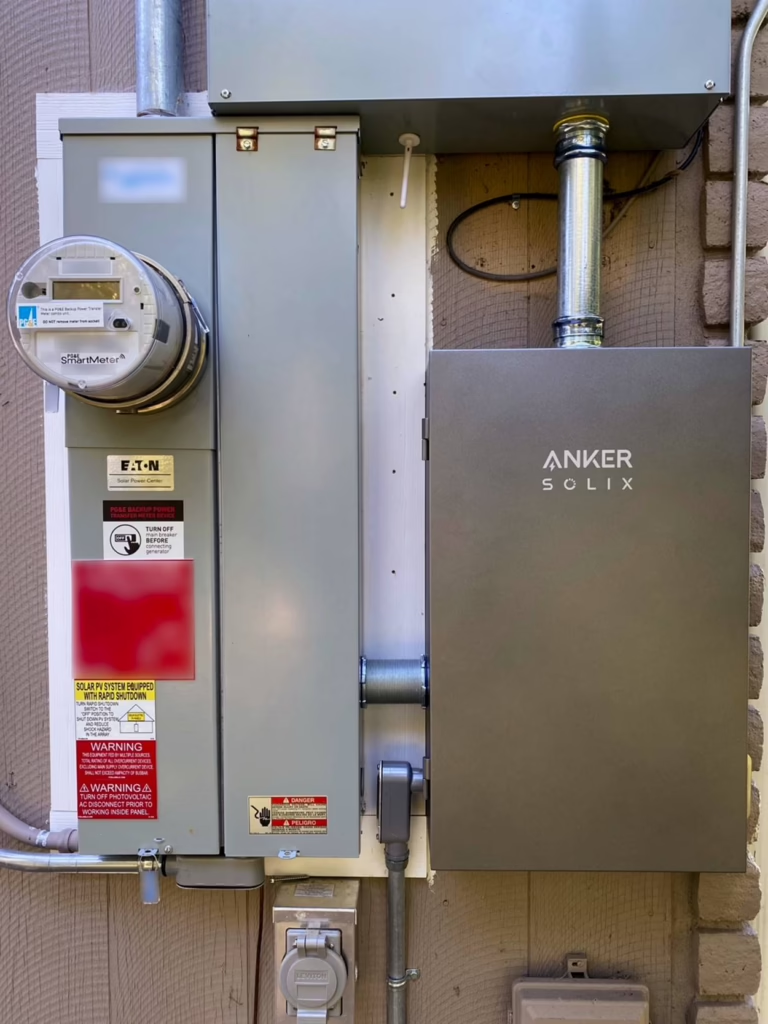
The integration point — Main panel (left) connected to the Anker SOLIX Power Dock (right); vestigial generator inlet for portable generator (bottom)
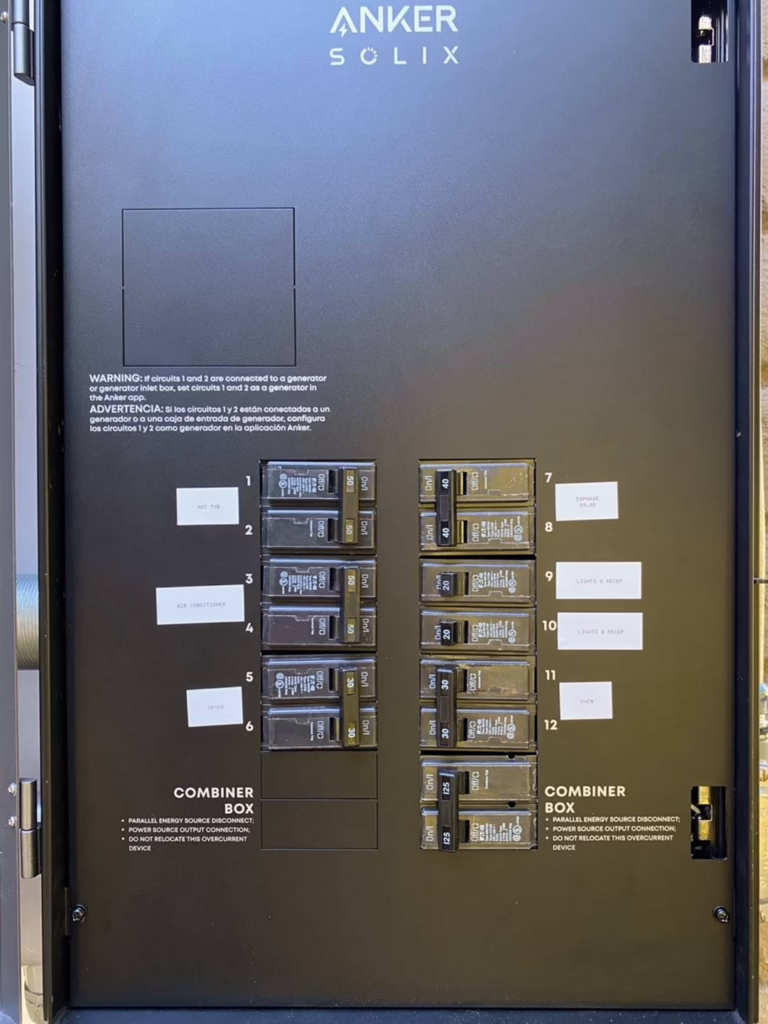
Power Dock interior — twelve smart circuits labeled to match the Anker app’s configuration
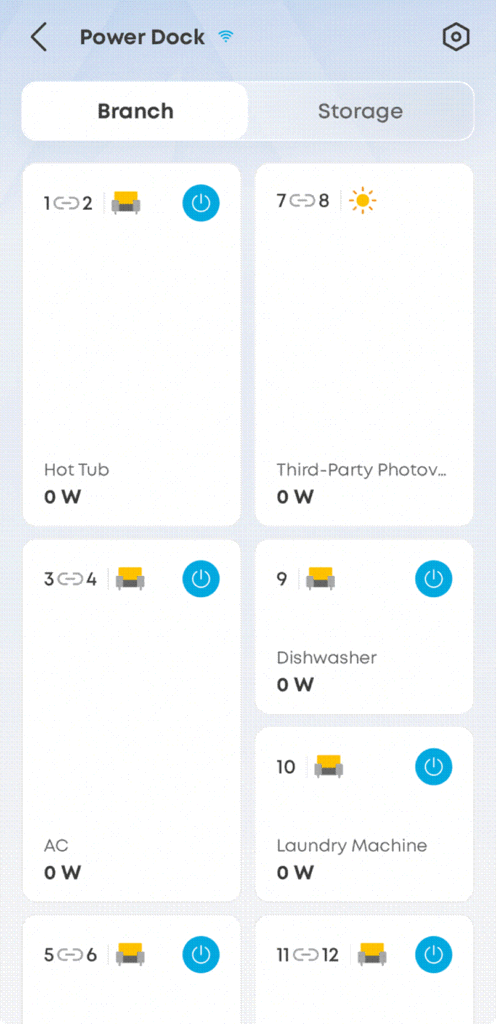
Anker app’s Smart Circuits configuration view — circuits 7 and 8 are reserved for third-party PV input; remaining circuits show assigned loads (AC, dishwasher, etc.) with current usage
Islanding during a grid outage
Two configuration requirements have to be met for third-party solar to keep producing during an outage:
- The third-party solar’s AC output must land on Circuits 7 and 8 of the Power Dock, and the Power Dock must be configured via the Anker app to recognize the input as AC PV.
- The solar inverter must support the IEEE 1547-2018 grid profile with the appropriate frequency-watt response. My Enphase microinverters already supported this and did not require any additional configuration.
When both conditions are met, the E10 forms a stable microgrid during an outage. When the battery hits its target state of charge, the inverter uses frequency-shift on the AC bus to throttle the microinverters — standard practice for AC-coupled islanding. Backfeed protection is handled by the Power Dock’s ATS.
I confirmed islanding operation with a simulated outage — flipping off the main breaker, watching the transfer happen automatically, and observing solar producing even without the grid connection. Throughout all of this, the AC and dryer ran simultaneously without issue.
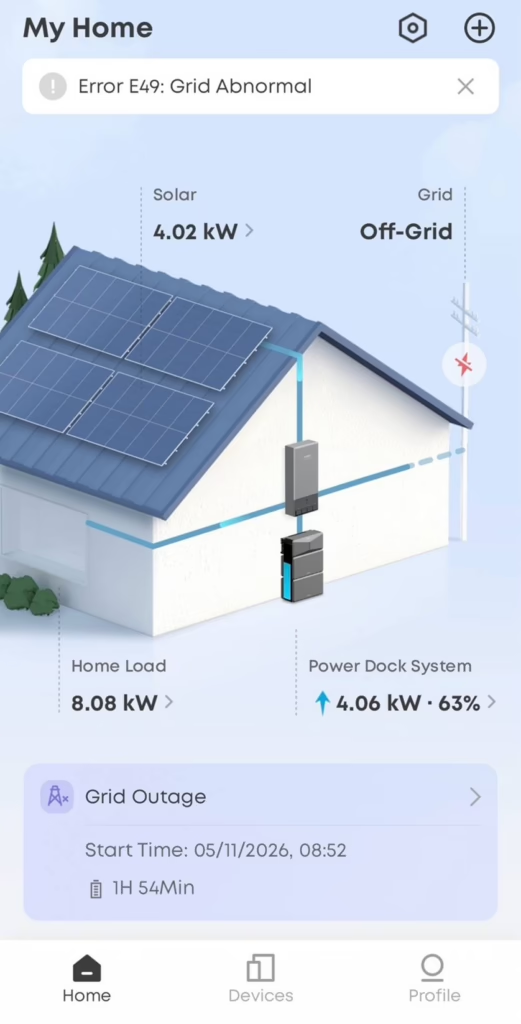
Anker app during the simulated outage — the system has correctly detected the abnormal grid condition and is supplying the home from solar plus battery
Then, less than a week later, a strong wind event struck, and we actually experienced an unplanned outage that lasted 4.5 hours and affected hundreds of customers in my area. The simulation had shown this would be a non-event, and that’s exactly what it was. The house ran without interruption and solar continued producing. The only signs from inside were a PG&E notification on my phone and, outside, the sound of neighboring generators running.
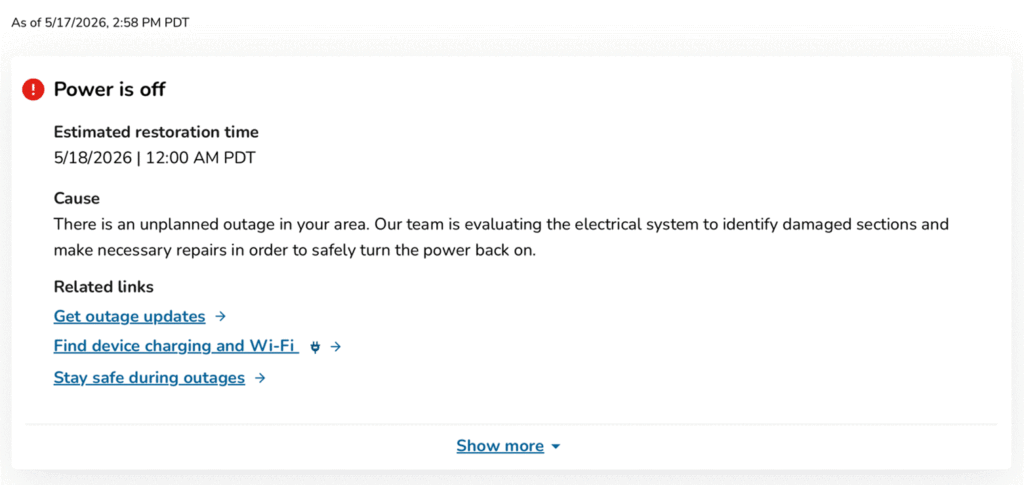
PG&E unplanned outage notification — the only indication from inside the house that the grid was down
One operational detail worth highlighting from the real outage: as the battery state-of-charge climbed past about 95%, the Enphase array’s output dropped to zero for a few hours — the inverter throttling the solar via frequency-shift on the AC bus — and resumed once the E10 SOC reached the low 90s. This is exactly how AC-coupled islanding is supposed to work; when there’s nowhere for surplus solar to go, the system tells the microinverters to back off.
Operating modes: how the E10 captures value day to day
The E10 exposes two operating modes in the Anker app — self-consumption and time-of-use — and the mode change is a settings selection, with no rewiring or commissioning involved. How the system implements each mode is straightforward and observable in the app’s live power flow view.
Self-consumption mode prioritizes the home’s own solar and battery over grid imports. The order of operations is exactly what you’d want and expect: solar production powers home loads first, true surplus charges the battery, and only when the battery is full does the rest export to the grid (and serve any loads still on the main panel). At night, the home runs from the battery, drawing from the grid only when the battery is depleted. For most NEM 3.0 customers, this is the right default: automatic savings, no active management.
Time-of-use mode times the battery’s discharge to coincide with peak-rate windows, rather than just whenever the home needs power. The battery also takes advantage of cheap electricity to charge — solar surplus during the day and off-peak grid power when needed. This is most useful when the peak/off-peak rate spread is wide — California’s E-ELEC summer rates being one example, and the “free overnight” plans some Texas retailers offer being another.
The Anker app also includes a setting called Storm Guard, which when enabled configures the Power Dock to monitor weather services in real time and auto-charge the battery ahead of severe weather like hurricanes, blizzards, and extreme temperatures. When the system received a weather alert for the high wind event mentioned earlier, it began charging at about 7.6 kW from the grid right at the forecast start time of the event, topping up the battery in advance of any potential outage. I saw this as a useful and common-sense software-defined convenience to automatically prepare for any potential outage.
Configuration tradeoffs that aren’t in the brochure
A few aspects of the system matter more than the marketing material implies.
Two modules is the minimum for full power output. This is the constraint I’d want every prospective buyer to understand before configuring an E10. With a single B6000 module attached, the inverter is limited to 7.6 kW of continuous output. With two or more modules, continuous output rises and the system unlocks a 10 kW Turbo mode that can be sustained for up to 90 minutes. This matters in practice: starting a central AC compressor while the dryer is already running or handling inrush from a water pump can briefly push current past 7.6 kW even when the steady-state load is well below that threshold. With one module, those events risk tripping the system; with two, they’re a non-event.
Capacity is the secondary benefit — two modules (12,288 Wh) ride out an evening peak comfortably and leave enough to start the next morning without the grid. Note that the E10 supports up to three inverter stacks of five modules each, for roughly 90 kWh of total storage at maximum expansion.
Proprietary connectors. The modules connect to each other and to the inverter with Anker-proprietary interconnects. Within an E10 system that’s not a meaningful issue. The forward-compatibility question is whether Anker continues to manufacture compatible modules years from now.
The companion Anker Smart Generator is a genuinely interesting piece of the system — a multi-fuel (gasoline, LPG, natural gas) DC generator that talks directly to the E10 inverter, bypassing the AC bus and charging the battery at up to 4,500 W in DC. Compared to my existing portable generator, the Smart Generator’s specs look like a clear upgrade: ~65.5 dB in Quiet mode, better fuel economy in DC-Eco mode (Anker quotes 1.7 kWh per liter of gasoline, 1 kWh per pound of propane, 45 kWh per MCF of natural gas), and integrated control through the same Anker app.
Unfortunately, the Smart Generator is not yet certified for sale in California. ESS News reported this at product launch and it remains the case. When I asked, Anker said the company is still working through the technical requirements for CARB certification and does not yet have a firm timeline to share.
Until that arrives, California E10 owners who want generator support have two integration options:
- Hardwired AC generator on the Power Dock, via a 4-prong generator inlet box, on Circuits 1 and 2. Note that this allocates two of the twelve smart circuits to generator input rather than to backed-up loads.
- AC generator charging the E10 directly via the inverter’s AC input.
Both options require a generator with total harmonic distortion below 10%. My existing portable open-frame generator likely runs in the 15–25% THD range, and Anker explicitly recommended against connecting it: in bypass mode the E10 does not condition the generator’s AC output before sending it to the house, so dirty power goes straight to sensitive electronics. That caveat applies to most inexpensive open-frame portables.
The intangibles
There’s a temptation in reviews like this to focus on payback in dollars and time to break even. The dollar math does matter — for a NEM 3.0 customer in PG&E territory, storage is the difference between a solar array that recovers most of its potential value and one that leaks economic upside back to the utility every afternoon. But the parts I’ve actually noticed living with the system are not on a spreadsheet.
Load shifting becomes optional optimization rather than mandatory discipline. Before the battery, I was running the dishwasher and the dryer on a schedule, watching the clock during the 4–9 PM peak window. With the battery doing self-consumption arbitrage in the background, the schedule goes away, and the dishwasher runs when there are dishes.
Outages stop being events. Nothing in the house behaved differently during the real outage that occurred after the install. For a family in an area where PSPS can mean 24–72 hours off-grid, that change in psychology is the real product.
Storage buys back normalcy. The dollar return is real, but the return that doesn’t show up in spreadsheets is the cognitive load you stop carrying, the resilience during PSPS events, and the freedom to make energy decisions based on convenience rather than rate schedules.
What I’d want to see next
A few things would make the E10 better.
Longer warranties. Reasonable for the category but conservative compared to where the storage market is heading. An LFP system of this design should comfortably outlast its warranted life.
CARB certification for the Smart Generator. A meaningful fraction of the U.S. customer base for high-resilience storage is in California. The Smart Generator is a very compelling piece of the product line, and unfortunately, we can’t buy one at this time.
Install videos linked from the documentation. Small fix for first-time installers, who are often going through Anker Solix training days anyway. Still, videos are great!
A documented local API. A read-only local API would be welcomed by the home-energy hobbyist crowd and integrate cleanly with platforms like Home Assistant. When I asked, Anker said Home Assistant integration for the E10 and Power Dock isn’t currently on the roadmap, but they’ve noted the suggestion for future evaluation.
Should home storage be the default?
I haven’t lived with another residential storage system, so I can’t compare the lived experience with competing brands and their capabilities. But the pricing math is real, and the broader question of whether this architecture should now be the default is worth asking.
On price: when I was scoping the solar installation in 2025, I received a quote for a FranklinWH aPower 2 (15 kWh) bundled with the PV at the same time. My E10 install — one Power Module and two B6000 modules, 12.288 kWh — came in at roughly 11% lower on a cost-per-kWh basis. Anker Solix and the wider Anker brand is a name most people associate with portable power stations and consumer charging gear, and the E10 represents a move up-market from that lineage. The price point reflects it.
More generally: for the last decade, the conventional answer for a fire-prone rural California property has been a whole-home propane or natural gas generator with an automatic transfer switch. These have well-known limitations: they’re loud, they need fuel logistics, and the internal starter battery is a recurring weak point. A starter battery that quietly fails announces itself at the next outage, when the generator doesn’t start. I’ve heard of this happening more than once — including to a neighbor during the same PG&E outage described earlier. Another friend had to drive to the hardware store during a different outage for a replacement starter battery. The failure mode isn’t rare.
A storage system like the E10, paired with rooftop solar that can keep producing during an outage, is a fundamentally different proposition: silent, mechanically simple, software-defined, and providing daily economic value rather than sitting idle for 360 days a year. Of course, it’s not the right answer for every household, and even where it is, multi-day winter storms with little solar production still favor a fuel-burning backstop. That’s exactly why the Smart Generator slot in the architecture matters. And as a relatively new entrant in a category dominated by larger residential storage vendors, the long-term durability story for the E10 will play out over years, not weeks.
But on price, modularity, and the cleanliness of the install, the E10 deserves a serious look as part of that next-generation default.
For now, the portable generator is still in the garage, retained as redundancy for a long-duration outage or emergency that the battery alone can’t cover. But day to day, the Anker Solix E10 is what powers the house — quietly, automatically, and on renewable energy captured from the Sun.
Silence, it turns out, is the upgrade.
Andrew is a computer engineer based in Northern California, where he writes about home energy and other technical hobbies. This review reflects the author’s personal experience.
Written by

Comments





Popular Posts